CESVA Lab

Software for downloading, displaying, editing and reporting data from SC420.
Main Features
The SC420 sound level meter measures a lot of functions for very long periods of time and also records audio files automatically. The best way to approach the analysis of all these functions together with the qualitative information provided by the audio files is to use the CESVA Lab software application.
 Download and configure
CESVA Lab is cost free and gives you a simple way to download all the information from the SC420 by simply removing the microSD card and post-process it. It also allows you configuring the SC420 from the PC.
 View and Listen
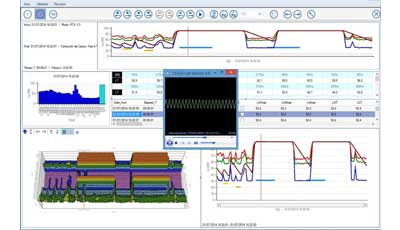
Moreover, it provides an intuitive and user-friendly interface which allows numerically and graphically display of all the measurement information on the screen in several synchronized panels (spectrum and time history graphs and 3D spectrograms) and listen to the audio files for each sound event.
 Export and Resport
To navigate through the information, CESVA Lab has an audio and mark browser and a very powerful zoom and pan tool for finding the desired section and then automatically generate a PDF report.
 Edit and re-calculate
If what you want is to recalculate a section, simply select it, add it to a layer and simply calculate. Different layers, containing several sections, can be calculated simultaneously. Each layer is calculated and saved in a separate file.

 Preuzmite prospekt proizvoda CESVA Lab